
 services@aitchsoft.com
A practical, production-tested walkthrough of binding native Swift and Kotlin SDKs into .NET MAUI apps. Covers Swift-to-Objective-C wrappers, XCFramework builds, Android AAR binding, Metadata.xml transformations, and the gotchas that don't show up in the official docs.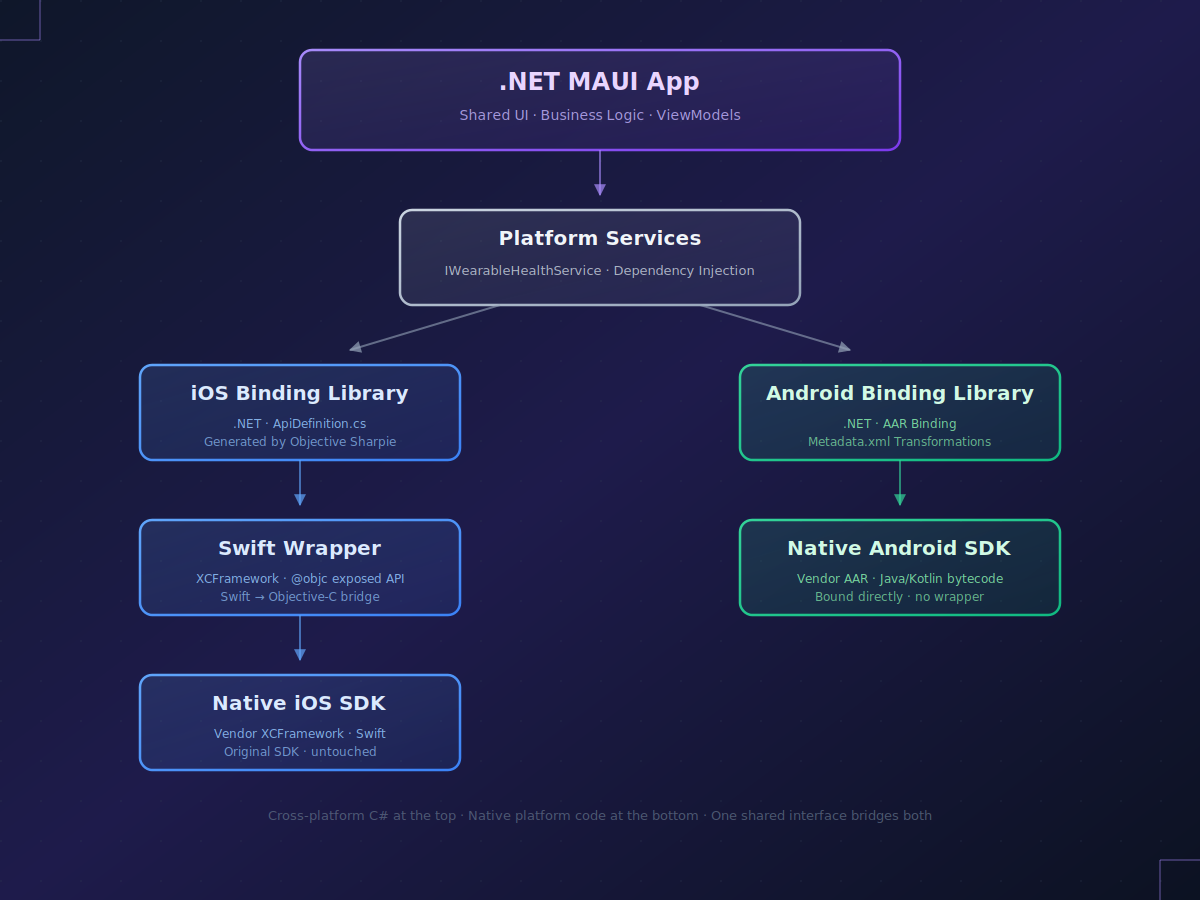
The problem cross-platform frameworks don't advertise
Cross-platform frameworks are built on a beautiful promise: one codebase, two platforms, ship faster. That promise holds up for the 80% of the app that's business logic, navigation, and standard UI. It starts to fray at the edges — and it breaks completely when your project depends on a third-party SDK that was never designed with your framework in mind.
If you're building a .NET MAUI app and need to integrate a vendor-supplied native SDK — a payments library, a hardware device API, a biometric authentication framework, a wearable integration — you'll run into a specific kind of pain. The SDK ships as a Swift framework for iOS and an Android AAR. MAUI speaks C#. Bridging the gap is not a thirty-minute task, and it's not something the official documentation fully prepares you for.
This post is a prose walkthrough of the process, drawn from a recent engagement where we bound a commercial wearable health device SDK into a cross-platform MAUI app — enabling device scanning, BLE pairing, and health data synchronization (steps, heart rate, sleep, activity) from a single C# codebase across iOS and Android. It covers the iOS side (Swift wrappers, XCFrameworks, Objective Sharpie), the Android side (AAR binding, transitive dependency resolution, Metadata.xml transformations), and the decisions and gotchas that only reveal themselves when you ship to production.
The full working reference — including every code sample, shell script, and transformation pattern — lives in our open-source repository: github.com/ihassantariq/maui-native-sdk-bindings. This post is the narrative version; the repo is the technical reference. Use both.
Why this is harder than it looks
The fundamental problem is architectural. MAUI's native interop layer on iOS can bind Objective-C APIs. Most modern iOS SDKs are written in Swift. That single mismatch means you can't bind directly — you need a Swift-to-Objective-C wrapper sitting between the vendor SDK and MAUI before any of your C# code can call into it.
On Android the situation is different but no less complex. MAUI can consume Java and Kotlin bytecode directly from AAR or JAR files, which is good. What's less obvious is that the binding generator will faithfully attempt to translate every class, method, and interface it finds — including obfuscated internal code, repackaged vendor dependencies, and generic type parameters that don't cleanly map to C#. The first build of any non-trivial Android binding project produces a wall of compile errors, and fixing them requires learning the transformation system that sits between the Java bytecode and the generated C# surface.
Neither problem is insurmountable. Both take time, patience, and a willingness to read generated code. Here's how the process actually works.
The iOS side: Swift, Objective-C, and the wrapper pattern
The architecture
You can't bind a Swift framework directly into .NET MAUI. What you can do is wrap the Swift SDK in a thin Swift-written framework that exposes an Objective-C compatible API surface, and then bind that wrapper into MAUI. The architecture ends up looking like this:
Every layer has one job. The vendor SDK stays untouched. The Swift wrapper is the translator — it takes the idiomatic Swift API of the vendor SDK (which likely uses async/await, optionals of non-class types, generics, and native Swift enums, none of which map cleanly to Objective-C) and exposes a simplified, Objective-C-compatible version. The .NET binding library is then auto-generated from the wrapper's Objective-C headers, and your MAUI app consumes the binding like any other NuGet package.
This wrapper-plus-binding pattern is the critical insight. If you skip it and try to bind the vendor SDK's Objective-C headers directly (assuming it even ships Objective-C-compatible headers, which many modern Swift SDKs don't), you'll be fighting Swift's name mangling, async runtime behavior, and type system for the life of the project.
Building the Swift wrapper
You start in Xcode with a new Framework project. Language: Swift. The key design rule: everything the wrapper exposes must be visible to Objective-C. In practice this means a handful of strict constraints:
- Every exposed class inherits from NSObject
- Every exposed method and property is annotated with @objc
- Explicit Objective-C names via @objc(ClassName) avoid Swift's name-mangling surprises
- Swift async/await is replaced with Objective-C-style completion handlers, wrapped internally in Task {}
- Swift enums are replaced with @objc enums or wrapper classes using integer constants
- Generics, tuples, and optionals of value types are flattened into concrete classes
Here's the pattern in miniature:
@objc(WearableManagerWrapper) public class WearableManagerWrapper: NSObject { @objc public func initializeSDK( license: String, clientId: String, clientSecret: String, completion: @escaping (Bool, String?) -> Void ) { Task { do { let config = SDKConfiguration( autoReconnectWithDevices: true, processData: false, persistFITFiles: true ) try await ConfigurationManager.shared.start( withSDKConfiguration: config, delegate: nil ) try ConfigurationManager.shared.set(license: license) completion(true, nil) } catch { completion(false, error.localizedDescription) } } } }
Model classes returned from the SDK are a common sticking point. Native Swift structs, enums, and generic types won't cross the ObjC boundary. The fix is a set of parallel wrapper classes that mirror the vendor models but conform to ObjC's type system:
@objc(ScannedDeviceWrapper) public class ScannedDeviceWrapper: NSObject { @objc public var identifier: String = "" @objc public var name: String = "" @objc public var unitId: UInt32 = 0 init(from nativeDevice: NativeDevice) { self.identifier = nativeDevice.identifier self.name = nativeDevice.name self.unitId = nativeDevice.unitId } }
Full implementation — including event delegate patterns, async result handling, and model conversion for complex types — is in the GitHub repository.
Building the XCFramework
Once the wrapper compiles, you need to package it as an XCFramework so it can be consumed by both iOS device builds and iOS Simulator builds from a single artifact. This is a two-archive build: one for iphoneos, one for iphonesimulator, then combined with xcodebuild -create-xcframework.
One build flag matters more than any other: BUILD_LIBRARY_FOR_DISTRIBUTION=YES. Without it, your framework will only work with the exact Swift compiler version you built against. Consumers downstream will hit module interface errors when their toolchain differs. With it, Xcode emits .swiftinterface files that allow the framework to survive Swift version changes. Miss this flag early and you'll rebuild the wrapper three times before figuring out why nothing works on your teammate's machine.
xcodebuild archive \ -scheme WearableWrapper \ -sdk iphoneos \ -archivePath ./build/WearableWrapper-iOS.xcarchive \ SKIP_INSTALL=NO \ BUILD_LIBRARY_FOR_DISTRIBUTION=YES xcodebuild archive \ -scheme WearableWrapper \ -sdk iphonesimulator \ -archivePath ./build/WearableWrapper-Simulator.xcarchive \ SKIP_INSTALL=NO \ BUILD_LIBRARY_FOR_DISTRIBUTION=YES xcodebuild -create-xcframework \ -framework ./build/WearableWrapper-iOS.xcarchive/Products/.../WearableWrapper.framework \ -framework ./build/WearableWrapper-Simulator.xcarchive/Products/.../WearableWrapper.framework \ -output ./build/WearableWrapper.xcframework
Generating C# bindings with Objective Sharpie
Microsoft's Objective Sharpie tool reads the auto-generated WearableWrapper-Swift.h header and emits initial C# binding definitions. In practice it gets you about 80% of the way there. The remaining 20% is manual cleanup:
- Delegate signatures Sharpie infers incorrectly, especially for completion handlers with multiple parameters or nullable values
- Missing or wrong [Export] selectors when Swift parameter labels don't match ObjC convention
- Classes that need [DisableDefaultCtor] because the underlying type has no zero-argument initializer
- Return type mismatches where Sharpie guessed NSObject but the real type is more specific
The resulting ApiDefinition.cs becomes the public C# surface of your binding library. It's the first place your MAUI app code will see the SDK, and it's worth spending time to make the naming and signatures feel idiomatic C#, not a literal transliteration of Objective-C selectors.
Wiring it into a .NET MAUI project
The final iOS step is creating a .NET iOS binding project (dotnet new ios-bindinglib), referencing both the Swift wrapper XCFramework and the vendor SDK's XCFramework as <NativeReference> items, and adding the cleaned-up ApiDefinition.cs as an <ObjcBindingApiDefinition> item. Both native references need <Kind>Framework</Kind> and <ForceLoad>True</ForceLoad> — without ForceLoad, the linker will strip symbols the wrapper depends on and your first SDK call will crash at runtime.
When this project compiles, your MAUI app can reference it, and using WearableWrapper; in any iOS-partial class gives you access to the entire SDK surface. That's the iOS side done.
The Android side: AAR binding and the Metadata.xml dance
Android is simpler in architecture and more tedious in execution. There's no wrapper layer — MAUI's Android binding generator can consume Java and Kotlin bytecode directly from the vendor AAR. But the binding generator's faithful translation of every class in the AAR means you'll spend most of your time telling it not to bind things, or to bind them differently than it wants to.
Start with the dependency tree
Before you touch the binding project, you need to know every transitive dependency the AAR will expect at runtime. Missing even one will cause runtime crashes that look nothing like dependency errors — you'll see ClassNotFoundException or NoSuchMethodError deep inside SDK calls, usually on a user's device rather than in your emulator, and usually only after a specific code path executes.
The fastest way to get a complete dependency list is to set up a minimal Android Studio project, add the vendor AAR as an implementation files(...) reference, and run Microsoft's Xamarin Gradle dependency info script. A single line in build.gradle does the work:
apply from: 'https://raw.githubusercontent.com/xamarin/XamarinComponents/main/Util/AndroidGradleDependencyInfo.gradle'
Running the xamarin Gradle task then builds the release AAR, copies all resolved dependencies into a folder, and prints a complete list of Maven artifacts with group IDs, artifact IDs, and versions. Sample output:
DEPENDENCIES: {GROUPID}:{ARTIFACTID} ({VERSION}) Maven Artifact: androidx.core:core (1.12.0) Maven Artifact: com.google.code.gson:gson (2.10.1) Maven Artifact: com.squareup.okhttp3:okhttp (4.12.0) Maven Artifact: com.squareup.retrofit2:retrofit (2.9.0) Maven Artifact: org.jetbrains.kotlin:kotlin-stdlib (1.9.22)
Each Maven artifact then needs to be mapped to a NuGet package. Most popular Android libraries have Xamarin.AndroidX.* equivalents on NuGet.org — Square.Retrofit2, GoogleGson, Xamarin.Kotlin.StdLib, Xamarin.AndroidX.Core, and so on. A quick search of nuget.org for the library name will usually surface the right package.
The one rule that saves you days
This is the single most important rule in Android binding work, and it's the one most likely to cost you days if you miss it: the binding project binds only the vendor SDK AAR. Dependency AARs and JARs go into the MAUI app project, not the binding project.
Here's why. If you add a dependency AAR to the binding project alongside the vendor SDK, the binding generator will happily try to generate C# bindings for both. You'll suddenly be looking at hundreds of compile errors for classes you never intended to call from C# — internal implementation details of a logging library, say, or an HTTP client's private AST nodes. Fixing these errors via Metadata.xml is a multi-day slog for zero benefit.
The correct structure:
<!-- Binding Project .csproj --> <ItemGroup> <AndroidLibrary Include="Jars/vendor-sdk.aar" /> <!-- ONLY the SDK you want to bind. No dependency AARs. --> </ItemGroup> <!-- MAUI App .csproj (Android target) --> <ItemGroup Condition="'$(TargetFramework)' == 'net9.0-android'"> <ProjectReference Include="../AndroidVendorBindings/AndroidVendorBindings.csproj" /> <AndroidAarLibrary Include="NativeLibs/logback-android-3.0.0.aar" /> <AndroidJavaLibrary Include="NativeLibs/vendor-data-processing.jar" /> </ItemGroup>
Dependencies that do have NuGet packages go into the binding project as standard <PackageReference> items. Dependencies that don't have NuGet packages go into the app project as raw AAR/JAR files, where they're present at link time but not bound.
The first build will fail
Budget for this. With any non-trivial Android SDK, your first dotnet build of the binding project will produce dozens to hundreds of errors. This isn't a sign something is wrong — it's the normal starting point of Android binding work.
The errors fall into predictable categories:
- CS0433 — duplicate type. The SDK bundles an internal copy of a class that also exists in a NuGet you're referencing (usually okhttp, gson, or kotlin-stdlib). Fix: remove the duplicate via Metadata.xml.
- CS0508 — return type mismatch. Usually a generic Parcelable.Creator<T> the generator couldn't infer. Fix: override the return type to Java.Lang.Object.
- CS0111 — duplicate member. ProGuard/R8 obfuscation produced methods like a(), b(), c() that collide in C#'s name resolution. Fix: remove the obfuscated methods.
- CS0535 — interface not implemented. A generic type parameter mapped wrong. Fix: set managedType on the parameter.
- CS0534 — abstract method not implemented. Missing type mapping. Fix: set managedReturn or managedType.
Fixing errors with Metadata.xml
Metadata.xml is where Android binding work lives. It's a transformation file the binding generator reads before emitting C#, and it lets you modify the generated API surface to fix every one of the error categories above.
Start with an empty Transforms/Metadata.xml and add fixes incrementally. After each fix, rebuild and see what errors remain. The file uses XPath to target packages, classes, methods, and fields from the Java bytecode, and attributes to describe what transformation to apply.
A few patterns recur across almost every binding project:
Removing conflicting repackaged classes — when the SDK bundles its own copy of a common library:
<remove-node path="/api/package[@name='repack.com.google.protobuf']/class[@name='ByteString']" /> <remove-node path="/api/package[@name='repack.com.google.protobuf']/class[@name='AbstractMessage']" />
Fixing Parcelable CREATOR return types — the single most tedious pattern; you'll repeat it for every Parcelable class in the SDK:
<attr path="/api/package[@name='com.vendor.health']/class[@name='Config.CREATOR']/method[@name='createFromParcel' and count(parameter)=1 and parameter[1][@type='android.os.Parcel']]" name="managedReturn">Java.Lang.Object</attr> <attr path="/api/package[@name='com.vendor.health']/class[@name='Config.CREATOR']/method[@name='newArray' and count(parameter)=1 and parameter[1][@type='int']]" name="managedReturn">Java.Lang.Object[]</attr>
Removing obfuscated duplicate methods — the ProGuard/R8 cleanup:
<remove-node path="/api/package[@name='com.vendor.internal']/class[@name='InitArgs']/method[@name='d' and count(parameter)=0]" /> <remove-node path="/api/package[@name='com.vendor.internal']/class[@name='InitArgs']/method[@name='f' and count(parameter)=0]" />
Kotlin Companion object renaming — Kotlin's Companion field can conflict with C# conventions:
<attr path="/api/package[@name='com.vendor.health']/class[@name='Manager']/field[@name='Companion']" name="managedName">CompanionInstance</attr>
Removing entire packages — when a whole internal namespace is causing problems and you have no reason to expose it:
<remove-node path="/api/package[@name='com.vendor.internal']" /> <remove-node path="/api/package[@name='com.vendor.sdk.proguard']" />
When you're stuck on an XPath that doesn't seem to be matching, check obj/Debug/net9.0-android/api.xml. That file contains the raw API definition the binding generator produced from the Java bytecode — exact package names, class names, method signatures, and the XPath structure you're targeting. Comparing your XPath against what's actually in api.xml resolves most matching issues in minutes.
For a complex vendor SDK, expect to write somewhere between 50 and 150 lines of Metadata.xml transformations. Budget one to three days for this phase of the work. The process is cyclical — build, read errors, add a fix, rebuild, repeat — until the project compiles cleanly.
ProGuard and release builds
One final Android concern: ProGuard. In release builds, Android's code shrinker will aggressively strip unused classes and methods. If your MAUI app calls into SDK code via reflection, or if the SDK itself uses reflection internally (many do), ProGuard will happily remove methods it thinks are unused and break your release builds in ways that work fine in debug.
The fix is explicit ProGuard rules in the MAUI app project:
# proguard.cfg -keep class com.vendor.** { *; } -keepclassmembers class com.vendor.** { *; } -dontwarn com.vendor.**
Write these rules the moment you create the binding, not the day before a release. The debug-works-release-crashes loop is particularly demoralizing on a tight deadline.
Consuming the bindings from MAUI
Once both binding projects compile, you consume them through a standard platform-specific service pattern. Define a shared interface in your MAUI project:
public interface IWearableHealthService { Task<bool> Initialize(string license, string clientId, string clientSecret); void StartScan(); List<WellnessData> GetWellnessData(string macAddress); event Action SdkInitialized; event Action<WearableDevice> DeviceConnected; }
Implement it per platform using the respective binding, and register the implementations in MauiProgram.cs:
#if ANDROID builder.Services.AddSingleton<IWearableHealthService, Platforms.Android.WearableHealthService>(); #elif IOS builder.Services.AddSingleton<IWearableHealthService, Platforms.iOS.WearableHealthService>(); #endif
From this point forward, your ViewModels and business logic consume IWearableHealthService without caring about the platform underneath. The binding plumbing — the Swift wrappers, the XCFrameworks, the AARs, the Metadata.xml transformations — is invisible to the rest of your codebase. Which is exactly how it should be.
Gotchas we've seen in production
A handful of issues show up repeatedly across projects. Worth knowing about in advance:
Threading on native callbacks. SDK callbacks frequently fire on background threads. If you update UI or MVVM-bound properties from those threads, you'll get silent failures or crashes that only reproduce under load. Wrap callback-to-UI transitions in MainThread.BeginInvokeOnMainThread at the service layer, not at the view layer. Do it once, in the binding service, so ViewModels can treat all events as main-thread-safe.
Data model mapping. Native SDK models, ObjC wrapper models, Android AAR models, and your domain models will all have different shapes. Build dedicated mapper classes at the service boundary. Don't try to reuse the binding types as your domain types — it couples your business logic to the vendor SDK and makes migrations painful.
Version locking. Lock the versions of your .NET SDK, the vendor native SDK, and every NuGet dependency. An automatic minor version bump on a Xamarin.AndroidX.* package can introduce transitive dependency conflicts that take a day to debug. In our experience, reproducibility is worth more than being on latest.
Wrapper API minimalism. Only expose the SDK surface your app actually uses. Every extra method in the wrapper is more Objective-C to write, more ApiDefinition to clean up, more Metadata.xml to maintain. When in doubt, leave it out and add it later when a real use case appears.
Is this worth doing?
If you're a solo developer with a two-week deadline and the SDK you need isn't available as a NuGet package, the honest answer might be "use a native app framework instead." The binding work for a complex SDK can easily consume two to four weeks of engineering time on the first go.
But that cost is front-loaded. Once the bindings are in place, your team can iterate on cross-platform C# code for the rest of the product's life without touching Swift or Kotlin again. For products that will live for years, across multiple feature releases, with a team that's stronger in C# than in native mobile, the trade is almost always worth it.
And the skills transfer. The Swift wrapper pattern is the same whether you're binding a wearable health SDK, a payments provider, or a biometric auth framework. The Android Metadata.xml transformations are the same whether the vendor AAR is a logging library or a hardware control SDK. Learning this once is an investment that pays off across every subsequent project.
The full technical reference
Every code sample in this post is a simplified excerpt. For complete working examples — build scripts, full ApiDefinition files, the full Metadata.xml transformation catalog, and debugging workflows using decompiler.com and JetBrains dotPeek — see our open-source reference repository:
github.com/ihassantariq/maui-native-sdk-bindings
The guide is MIT-licensed and maintained as a living document. If you spot a gap or a better pattern, we welcome issues and pull requests.
If you're working on a .NET MAUI integration with a complex native SDK and want a second set of eyes on the approach, get in touch with us. We're happy to take a look.